

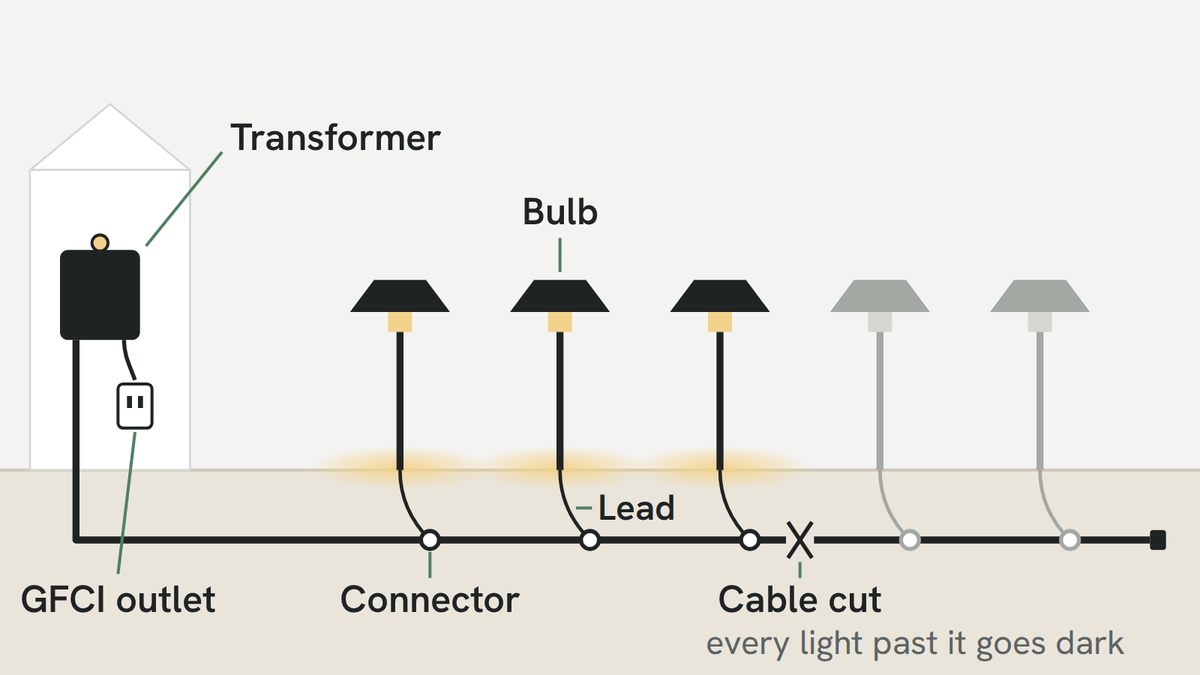
Start with the symptom. The checks below are a practical sequence, not a ranking based on measured failure rates. Confirm the cause before buying a replacement part.
Before inspecting a connector, swapping a bulb or touching a cable: unplug the transformer or disconnect the kit's power supply, then let hot fixtures cool. Reconnect power only for the completed test. Do not open household-voltage equipment; stop if protective devices keep tripping.
- Connector a useful early check for a single dark fixture
- GFCI first when every light is out, before the transformer
- Swap test a bulb from a working light shows whether the bulb failed
Use the symptoms to narrow the area: one dark light suggests local checks; a dark section suggests a shared connection or cable; a whole outage also calls for checking the power source and controls. More than one fault is possible.
- One light is outStart at its connector
- Everything past one light is outA cut or a wet splice in the cable
- Every light is outReset the GFCI outlet first
- The far end is dimmer than the restA wet connector, or the cable
- A light flickers, or the run goes off and onA loose joint, a loose bulb, or overload
- On or off at the wrong timeThe photocell or the timer

One light is out
- The connector, where the fixture lead joins the cable. With power disconnected, inspect for looseness, moisture, corrosion or damage. Follow the connector and cable instructions for repair, using a new connector rated for the conductor sizes and wet/buried location.
- The bulb, if the model has a replaceable one. With power disconnected, swap in a known-working bulb only if it is compatible with that fixture. Restore power for the test, then disconnect it again before further work. Our Pagoda, China Hat and Bollard path lights use G4; the replaceable spotlight uses MR16. Our bulb collection currently lists MR16 replacements, not G4.
- The lead, the short wire from the fixture to the connector. A spade, an edger or a string trimmer can nick it. Look along its length for a cut.


Everything past one light is out
The lights before a certain point work and every light after it is dark. Power is stopping at one place on the main cable: the cable is cut there, or a splice in it has let water in.
- Find the place. The fault is between the last light that works and the first one that does not.
- Check the joints in that stretch: the connector at the first dark light, and any splice in the cable between it and the last working one.
- Walk the cable. Look for what changed: a new bed, a fence post, an aerated lawn, a shrub that went in last weekend. A spade through the cable is the usual story.
- Splice it with a sealed connector, turn the lights on to check, then bury it again.
Every light is out
- The GFCI outlet. Check its status and follow the device and transformer instructions. If it trips again, stop resetting it and have the fault investigated. Do not open or repair the household-voltage outlet as part of this guide. Use the supply connection specified for the transformer.
- The timer and photocell. Switch the timer to manual on. If the lights come on, the wiring is fine and the problem is the schedule; see the wrong time below.
- The transformer's breaker or fuse. Many transformers shut their output off when they are overloaded or see a short in the cable. Unplug it, add up the watts on the run and make sure they are under the rating, look for a nicked cable, then reset it as its instructions say.
- The transformer itself. If the supply and settings have been checked and the output still does not work, contact us for model-specific checks rather than opening the unit.

The far end is dimmer than the rest
Dimming at the far end can indicate voltage drop or a connection problem, but it does not prove that every fixture is sound. Check the cable, connections, load and input range; LED behavior varies by driver.
If a previously bright run dims, inspect for changes such as added load, cable damage or a loose/wet connection. If it was dim from installation, review the layout and voltage drop. Disconnect power before inspecting joints. The wire guide explains the factors to check.

A light flickers, or the whole run goes off and on
- One light flickers A loose or wet connection at that light, or a bulb not seated all the way in its socket. Reseat the bulb first, then open the connector.
- The far end flickers The same cause as a dim far end, and the same fixes.
- The whole run goes off and on Possible causes include protection responding to overload or a fault, supply interruptions, or controls. Disconnect power; check load limits, visible cable damage and settings against the instructions. An 80% lamp-load allowance does not diagnose the fault. If tripping repeats, stop and seek support.
The lights come on or go off at the wrong time
- On in the daytime The photocell is covered by snow, leaves, a pot or a shrub that has grown over it, or the timer has been left on manual. Clear it.
- Not on at dusk The photocell can see another light, such as a porch light, a streetlight or a security light, and thinks it is still day. Move it or shield it so it sees only the sky.
- Off at the wrong hour An hour out since the clocks changed, or earlier than it used to be as the evenings draw in: that is the timer's schedule, not a fault. How to set a landscape lighting timer covers it.
When it is the part
If the fault remains after the recommended checks, the fixture or another component may need service. Email support@hiboitec.com with your order number, exact product, symptoms and a photo. See the warranty terms for coverage.
Questions people ask
Why did only one of my landscape lights stop working?
Possible causes include a loose or wet connector, a failed replaceable bulb, a damaged lead or a fixture fault. Disconnect power before inspection or a compatible-bulb swap. Use the checks to identify the failed component rather than assuming the cause from the symptom alone.
Why did half my landscape lights stop working?
When every light past a certain point is dark, power is stopping at that point on the main cable: a cut, or a splice that has let water in. The fault is between the last light that works and the first one that does not.
Why are all my landscape lights out?
Check the supply/GFCI status, timer mode and transformer protection according to their instructions. Disconnect power before inspecting wiring. If a protective device trips again, stop resetting it and have the fault investigated. These checks do not establish which component has failed.
Why does one landscape light flicker?
Possible causes include a loose or wet connection, a poorly seated bulb or a fixture/driver issue. Disconnect power and allow the lamp to cool before reseating it or inspecting the joint. Use the correct connector for any repair, then restore power to test.


